의존성 주입(Dependency Injection)
✒️ 2025-06-30 11:32 내용 수정
참고 자료 : Spring Dependency Injection, Spring Using @Autowired, nova_dev's Spring 스프링 의존 자동 주입(Auto Injection)이란
의존성 주입(Dependency Injection)
Spring Container가 각 객체간의 의존 관계를 개발자가 정의한 Bean 등록 정보를 바탕으로 자동 주입하는 기능
- Spring과 Spring Boot에서 모두 사용한다.
- 한 객체가 다른 객체를 의존할 때 개발자가 그 의존 관계를 정의해준다.
- Spring Container가 파일이나 정의된 내용을 읽고 특정 객체가 의존하는 다른 객체를 자동으로 생성하거나 이미 존재하면 그 객체를 찾아 주입해준다.
- 의존 대상을 설정 코드에서 직접 주입하지 않고, Annotation이나 XML 설정을 통해 Spring이 자동으로 Bean 객체를 주입하는 것이다.
- Spring과 Spring boot에서는 생성자 주입을 권장하며, 의존성 주입이 안된 객체는 생성되지 않기에 NullPointerException 예외가 발생하기에 생성자 주입을 해야 한다.
- 또한 의존성 주입 시 Spring은 인터페이스 타입의 의존성을 주입하면 해당 인터페이스를 구현한 Bean을 자동으로 주입한다.
- 구현체가 없는 경우엔 'no type match found' 에러가 런타임에 발생한다.
의존성 주입 설정
1. XML 방식
- XML 파일의
<bean>태그 내에property태그나constructor-arg태그를 사용하여 의존성을 설정한다.- Setter 주입 방식에선
property태그의name은 필드나 메서드 이름을,ref는 Bean 이름을 작성한다. - 생성자 주입 방식엔
constructor-arg태그의ref에 Bean 이름을 작성한다.
- Setter 주입 방식에선
<!-- XML 설정 예시 -->
<beans xmlns="http://www.springframework.org/schema/beans"
       xmlns:xsi="http://www.w3.org/2001/XMLSchema-instance"
       xsi:schemaLocation="
         http://www.springframework.org/schema/beans
         https://www.springframework.org/schema/beans/spring-beans.xsd">

    <bean id="anotherExampleBean" class="examples.AnotherBean"/>
    <bean id="yetAnotherBean" class="examples.YetAnotherBean"/>
    <bean id="exampleBean" class="examples.ExampleBean">
        <!-- setter 주입 -->
        <property name="beanOne">
            <ref bean="anotherExampleBean"/>
        </property>
        <property name="beanTwo" ref="yetAnotherBean"/>
    </bean>
</beans>
<beans xmlns="http://www.springframework.org/schema/beans"
       xmlns:xsi="http://www.w3.org/2001/XMLSchema-instance"
       xsi:schemaLocation="
         http://www.springframework.org/schema/beans
         https://www.springframework.org/schema/beans/spring-beans.xsd">

    <bean id="anotherExampleBean" class="examples.AnotherBean"/>
    <bean id="yetAnotherBean" class="examples.YetAnotherBean"/>
    <bean id="exampleBean" class="examples.ExampleBean">
        <!-- 생성자 주입 -->
        <constructor-arg ref="anotherExampleBean"/>
        <constructor-arg ref="yetAnotherBean"/>
    </bean>
</beans>
2. Annotation 방식
- 의존성을 주입할 땐 주입할 대상에
@Autowired나@Resource를 사용하고, Spring에선@Autowired를 주로 사용한다.
public class Test {
	private final TestBean testBean;

	@Autowired
	public Test(TestBean testBean) {
		this.testBean = testBean;
	}
}
의존성 주입 방법
1. 필드 주입(Field Injection)
- 필드에서 의존성을 주입하는 방법이다.
public class Computer {
	@Autowired
	private CPU cpu;

	public CPU getCpu() {
		return cpu;
	}
}
필드 주입의 문제
- 객체 지향의 원칙(SOLID) 중 하나인 의존관계 역전 원칙(DIP)을 위배한다.
- 필드 주입 시엔 필드가 외부에 보여지지 않으며, 추상화가 아닌 구현체에 의존하게 되어 강한 결합을 만들게 된다.
- 의존성 가변 문제 : 생성자 주입의 경우 클래스의 의존성을 불변하게 만들 수 있지만, 필드 주입의 경우엔 필드에 직접 주입하는 방식이므로 의존성이 변할 수 있다.
- 테스트 및 의존성 관리의 유연성이 떨어지는 문제도 발생한다.
- 참고 자료 : Geeksforgeeks Why Is Field Injection Not Recommended in Spring
2. 수정자 주입(Setter Injection)
- Spring Container가 기본 생성자나 기본
staticfactory method로 Bean을 인스턴스화한 후, 의존성으로 주입할 객체를 필드에 지정하는 setter 메서드를 통해 객체를 주입한다. - Setter 주입은 선택적 의존성을 처리하고, 클래스를 재구성 혹은 재주입 받는 경우에 사용한다.
- 클래스에 합리적인 기본값을 배정하고 이후에 의존성 주입을 고려하는 선택적 의존성 처리 상황에 사용한다.
- 기본값 배정이 없는 경우 Not-Null 체크 코드가 필요하다.
public class Computer {
	private CPU cpu;

	@Autowired
	public void setCpu(CPU cpu) {
		this.cpu = cpu;
	}
}
3. 생성자 주입(Constructor Injection)
- Spring과 Spring Boot에서 가장 권장하는 의존성 주입 방법이다.
- 의존성을 주입할 객체를 매개변수로 받는 생성자를 추가한다.
- 주입될 객체의 필드는
final로 지정하여 클래스 생성 이후엔 의존성이 불변하도록 설정한다. - Spring 4.3 버전 이후부턴 하나의 생성자만 정의할 경우
@Autowired를 생략해도 된다.- 하지만 생성자가 여러 개 존재하고 기본 생성자나 primary 생성자가 없다면 최소 1개의 생성자에
@Autowired를 추가해야 한다.
- 하지만 생성자가 여러 개 존재하고 기본 생성자나 primary 생성자가 없다면 최소 1개의 생성자에
public class Computer {
	private CPU cpu;

	@Autowired
	public Computer(CPU cpu) {
		this.cpu = cpu;
	}
}
- 생성자 주입을 사용하면 필수 의존성을 처리할 수 있고, 객체를 불변하게 유지할 수 있다.
- 또한 생성자를 완전히 초기화된 상태로 반환한다.
- 다만 생성자의 인자가 너무 많아지면 클래스가 너무 많은 역할을 담당하는 구조일 수 있기에 더 적절한 관심사 분리를 위한 리팩터링을 고려해야 한다.
객체 구분을 위한 @Qualifier
- 위에서 얘기했듯 인터페이스 타입의 의존성을 주입하면 구현체 클래스 Bean을 자동으로 주입하는데, 인터페이스를 구현한 클래스가 여러 개 있을 때 의존성 주입 시 type을 찾지 못하는 문제가 발생한다.
- 이처럼 같은 타입의 객체가 여러 개 존재할 때는
@QualifierAnnotation을 붙여 구분해준다.- default로 사용할 객체에는
@PrimaryAnnotation을 붙여준다.
- default로 사용할 객체에는
// interface를 만든다.
package com.example.first.qualifier;

public interface Computer {
	public int getScreenWidth();
}
package com.example.first.qualifier;

import org.springframework.beans.factory.annotation.Qualifier;
import org.springframework.stereotype.Component;

@Component
@Qualifier("desktop") // Qualifier를 추가
// Computer를 구현한 클래스 1
public class Desktop implements Computer{

	@Override
	public int getScreenWidth() {
		return 1920;
	}
}
package com.example.first.qualifier;

import org.springframework.beans.factory.annotation.Qualifier;
import org.springframework.context.annotation.Primary;
import org.springframework.stereotype.Component;

@Component
@Qualifier("laptop") // Qualifier를 추가
// Computer를 구현한 클래스 2
public class Laptop implements Computer{

	@Override
	public int getScreenWidth() {
		return 1600;
	}
}
src/test/java폴더에서qualifier패키지를 추가하고, Test 클래스를 만들어 테스트했다.- 테스트 방법은 Test와 Test 코드로 진행했다.
@Qualifier("desktop")로 의존성 주입을 하면Desktop클래스가 선택된다.
package com.example.first.qualifier;

import org.junit.jupiter.api.Test;
import org.springframework.beans.factory.annotation.Autowired;
import org.springframework.beans.factory.annotation.Qualifier;
import org.springframework.boot.test.context.SpringBootTest;

@SpringBootTest
public class ComputerTest {

	@Autowired
	@Qualifier("desktop")
	Computer computer; // Desktop 클래스로 선택된다

	@Test
	public void computerTest() {
		System.out.println(computer.getScreenWidth());
	}
}
1920
package com.example.first.qualifier;

import org.junit.jupiter.api.Test;
import org.springframework.beans.factory.annotation.Autowired;
import org.springframework.beans.factory.annotation.Qualifier;
import org.springframework.boot.test.context.SpringBootTest;

import lombok.extern.slf4j.Slf4j;

@SpringBootTest
@Slf4j // 테스트
public class ComputerTest {

	@Autowired
	@Qualifier("laptop")
	Computer computer; // Laptop 클래스로 선택된다

	@Test
	public void computerTest() {
		System.out.println(computer.getScreenWidth());
	}
}
1600
- 이번엔
Laptop클래스에@Primary를 추가하여 다시 테스트해본다.
@Component
@Qualifier("laptop")
@Primary // Qualifier 중 기본 클래스로 설정
public class Laptop implements Computer{

	@Override
	public int getScreenWidth() {
		return 1600;
	}
}
- 의존성 주입 시
@Qualifier를 지정하지 않아도@Primary가 설정된Laptop클래스가 선택된다.
package com.example.first.qualifier;

import org.junit.jupiter.api.Test;
import org.springframework.beans.factory.annotation.Autowired;
import org.springframework.beans.factory.annotation.Qualifier;
import org.springframework.boot.test.context.SpringBootTest;

@SpringBootTest
public class ComputerTest {

	@Autowired
	Computer computer; // Laptop 클래스로 선택된다

	@Test
	public void computerTest() {
		System.out.println(computer.getScreenWidth());
	}
}
1600
DI를 이용한 MVC 흐름
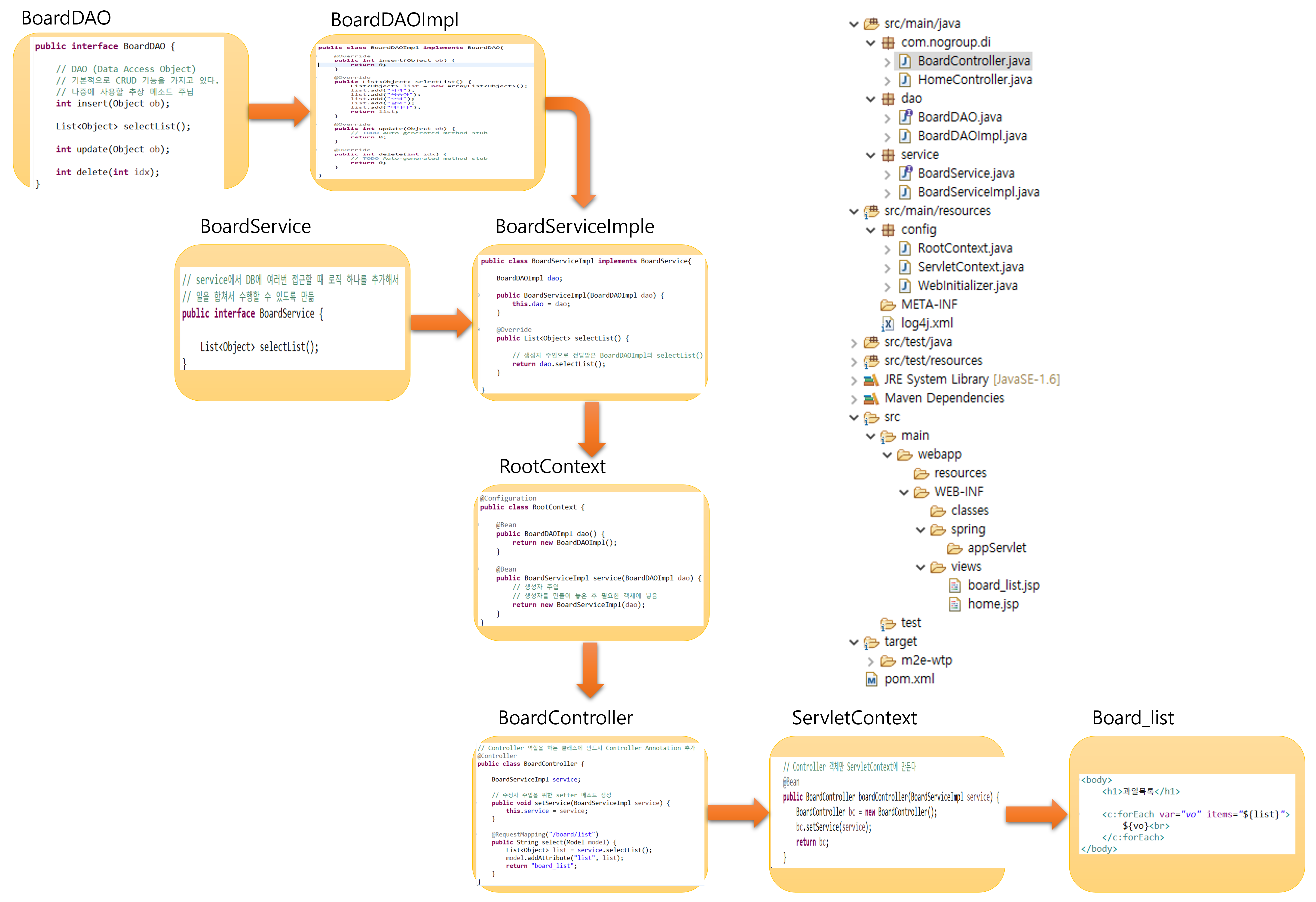
- 실습은 Spring으로 진행했다.
- 실습 진행 시점이 Spring을 처음 배웠던 2024년 1월이었기에 실습의 일부 설명은 나중에 추가한 이론적 설명과 일치하지 않는 부분이나 누락된 부분이 많다.
0. 프로젝트 설정
1. BoardDAO 인터페이스
- DAO의 기본 기능들을 작성한다. (CRUD 기능)
package dao;

import java.util.List;

public interface BoardDAO {

	// DAO (Data Access Object)
	// 기본적으로 CRUD 기능을 가지고 있다.
	// 나중에 사용할 추상 메소드 주입
	int insert(Object ob);

	List<Object> selectList();

	int update(Object ob);

	int delete(int idx);
}
2. BoardDAOImpl 클래스
- BoardDAO 인터페이스를 구현한 클래스다.
- DB에 연결되어 있다면 DB로부터 CRUD를 실제 작업하는 위치다.
- 예시로 selectList()에서 데이터를 받아왔다고 가정하여 실습했다.
package dao;

import java.util.ArrayList;
import java.util.List;

public class BoardDAOImpl implements BoardDAO{

	@Override
	public int insert(Object ob) {
		return 0;
	}

	@Override
	public List<Object> selectList() {
		List<Object> list = new ArrayList<Object>();
		list.add("사과");
		list.add("복숭아");
		list.add("수박");
		list.add("참외");
		list.add("바나나");
		return list;
	}

	@Override
	public int update(Object ob) {
		// TODO Auto-generated method stub
		return 0;
	}

	@Override
	public int delete(int idx) {
		// TODO Auto-generated method stub
		return 0;
	}

}
3. BoardService 인터페이스
- service에서 dao 객체 생성 및 DB에서 작업할 로직을 추가한다.
package service;

import java.util.List;

// service에서 DB에 여러번 접근할 때 로직 하나를 추가해서
// 일을 합쳐서 수행할 수 있도록 만듦
public interface BoardService {

	List<Object> selectList();
}
4. BoardServiceImpl 클래스
- BoardService 인터페이스를 구현한 클래스
- DAO 객체를 필드로 가지고, 생성자에 DAO 객체를 받는 생성자 주입이 있다.
package service;

import java.util.List;

import dao.BoardDAOImpl;

public class BoardServiceImpl implements BoardService{

	BoardDAOImpl dao;

	public BoardServiceImpl(BoardDAOImpl dao) {
		this.dao = dao;
	}

	@Override
	public List<Object> selectList() {

		// 생성자 주입으로 전달받은 BoardDAOImpl의 selectList()
		return dao.selectList();
	}

}
5. RootContext에 Bean 객체 생성
- BoardDAOImpl 클래스와 BoardServiceImpl 클래스의 객체를 Bean 객체로 추가한다.
- 이 때 BoardServiceImpl 클래스 객체는 생성자 주입을 통해 BoardDAOImpl 클래스 객체를 주입한다.
package config;

import org.springframework.context.annotation.Bean;
import org.springframework.context.annotation.Configuration;

import dao.BoardDAOImpl;
import service.BoardServiceImpl;

@Configuration
public class RootContext {

	@Bean
	public BoardDAOImpl dao() {
		return new BoardDAOImpl();
	}

	@Bean
	public BoardServiceImpl service(BoardDAOImpl dao) {
		// 생성자 주입
		// 생성자를 만들어 놓은 후 필요한 객체에 넣음
		return new BoardServiceImpl(dao);
	}
}
6. BoardController 클래스
- Servlet에서 바인딩과 포워딩 역할을 수행하는 클래스
- BoardServiceImpl 클래스 객체를 필드로 가지고, setter를 이용한 수정자 주입으로 객체를 주입받는다.
package com.nogroup.di;

import java.util.List;

import org.springframework.stereotype.Controller;
import org.springframework.ui.Model;
import org.springframework.web.bind.annotation.RequestMapping;

import service.BoardServiceImpl;

// Controller 역할을 하는 클래스에 반드시 Controller Annotation 추가
@Controller
public class BoardController {

	BoardServiceImpl service;

	// 수정자 주입을 위한 setter 메소드 생성
	public void setService(BoardServiceImpl service) {
		this.service = service;
	}

	@RequestMapping("/board/list")
	public String select(Model model) {
		List<Object> list = service.selectList();
		model.addAttribute("list", list);
		return "board_list";
	}
}
7. ServletContext에 BoardController 객체 생성
- Controller 객체만 ServletContext에 만든다.
- 이 때 BoardController 클래스는 BoardServiceImpl 클래스 객체를 수정자 주입받기 때문에 BoardServiceImpl 클래스 객체도 함께 넘겨준다.
package config;

import org.springframework.context.annotation.Bean;
import org.springframework.context.annotation.ComponentScan;
import org.springframework.context.annotation.Configuration;
import org.springframework.web.servlet.config.annotation.EnableWebMvc;
import org.springframework.web.servlet.config.annotation.ResourceHandlerRegistry;
import org.springframework.web.servlet.config.annotation.WebMvcConfigurer;
import org.springframework.web.servlet.view.InternalResourceViewResolver;
import org.springframework.web.servlet.view.JstlView;

import com.nogroup.di.BoardController;

import service.BoardServiceImpl;

@Configuration
@EnableWebMvc
@ComponentScan("com.nogroup.di")
public class ServletContext implements WebMvcConfigurer{
	@Override
	public void addResourceHandlers(ResourceHandlerRegistry registry) {
		registry.addResourceHandler("/resources/**").addResourceLocations("/resources/");
	}

	@Bean
	public InternalResourceViewResolver resolver() {
		InternalResourceViewResolver resolver = new InternalResourceViewResolver();
		resolver.setViewClass(JstlView.class);
		resolver.setPrefix("/WEB-INF/views/");
		resolver.setSuffix(".jsp");
		return resolver;
	}

	// Controller 객체만 ServletContext에 만든다
	@Bean
	public BoardController boardController(BoardServiceImpl service) {
		BoardController bc = new BoardController();
		bc.setService(service);
		return bc;
	}
}
8. 정보를 보여줄 board_list.jsp 생성
- 포워딩된 정보를 보여줄 웹 페이지
<%@ page language="java" contentType="text/html; charset=UTF-8"
    pageEncoding="UTF-8"%>
<%@ taglib prefix="c" uri="http://java.sun.com/jsp/jstl/core" %>
<!DOCTYPE html>
<html>
<head>
<meta charset="UTF-8">
<title>Insert title here</title>
</head>
<body>
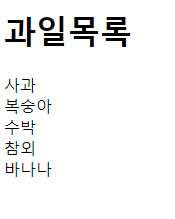
	<h1>과일목록</h1>

	<c:forEach var="vo" items="${list}">
		${vo}<br>
	</c:forEach>
</body>
</html>